A modern help center has the power to transform customer self-service and reduce agents’ manual workload. Learn everything there is to know about building a help center in this guide.
Lauren Hakim
Director, Product Marketing
Last updated January 22, 2026
Today’s customers expect fast, easy resolutions. When answers aren’t easy to find or issues go unresolved, they won’t wait around–they’ll look elsewhere. One of the best ways to avoid this wasted opportunity is by creating a well-structured, informative help center that enables intuitive customer self-service.
An intuitively built help center makes it easier to deliver quick, consistent support at scale, while relieving pressure on support teams. In this guide, you’ll learn how to build a help center that empowers customers, supports agents, and helps your business keep up with rising customer service expectations.
A help center is a centralized, customer-facing hub where people can find answers to common questions and issues. It helps customers learn how to use products or services, and resolve issues on their own through self-service resources like guides, articles, and FAQs.
Why self-service is important in customer service
The expectation of seamless customer self-service experiences has become ingrained in today’s consumer culture. When individuals can’t find the information needed to resolve issues independently, they can quickly lose trust in the company’s reliability and attention to detail. Addressing the causes of these frustrations with a customer self-service portal is crucial for delivering a great experience.
What problems does a help center help solve?
Some of the most common challenges facing support teams include:
High ticket volumes containing simple, repetitive questions.
Agents answering the same questions again and again.
Customers waiting longer than they should for help.
Inconsistent knowledge management with information scattered across teams and tools.
A well-structured help center can solve all of these problems. With simple, intuitive self-service, customers get immediate access to answers through a single source of truth. This deflects routine tickets before they reach your agents, reducing ticket volume and freeing up your agents to focus on more complex, higher-impact conversations.
How to build a help center for customer service
Building an effective help center isn’t a one-time task, it’s an ongoing way to support customers at scale. When executed effectively, it helps your team handle growing support demands while still delivering fast, consistent service. The following steps walk you through how to create a help center from the ground up.
1. Define your strategy and goals
To build an effective help center, it’s essential to design it around real customer needs. Without a clear plan or strategy, you risk creating low-impact or irrelevant content that leaves critical gaps in your knowledge base.
To start, it’s important to understand your audience inside out. What questions does your support team hear most often? Which channels do customers use to reach out? The answers to these questions will determine the content types and formats of the help center (such as text, video, or visuals). Begin with most asked questions that create friction for your support team, then expand over time.
At this stage, you also need to set clear goals. These are likely to be lowering ticket volume, improving customer satisfaction (CSAT), supporting growth, or a combination of these.
2. Choose the right technology and structure
When building a help center, choose technology that meets current and anticipated needs. The software should integrate with your existing support tools in order to keep workflows consistent across channels.
You also need to map out a clear structure for your help center. The user experience (UX) should be simple and intuitive, making it easy for customers to find the right answers. If the structure is confusing, customers are less likely to use self-service and more likely to contact support instead. This increases ticket volume and slows down resolutions.
3. Create your core knowledge base content
Even the best designed platforms won’t deliver value if their content doesn’t help solve real problems. Start with FAQs, step-by-step guides, and straightforward troubleshooting articles that address common issues. Use clear, concise language and visuals like screenshots or videos to clarify complex steps and reduce confusion.
Don’t aim for perfection at this stage, the goal here is to start creating useful content. You can refine and expand articles as you learn more about what customers actually need, especially when following knowledge-centered service practices informed by real support interactions.
4. Launch and make your help center easy to find
Once your help center is ready, make sure your customers can easily find and use it. Display it prominently across the website and support experience, so customers can clearly see it as a self-service option. It’s also key to encourage early adoption via existing channels like email, social media, and live chat. Over time, your help center should become the first place customers look for answers, not a last resort.
5. Measure success against customer service outcomes
After launch, revisit your original goals and make them measurable. Look at key objectives such as:
Common issues resolved faster and more consistently.
Clear metrics help you understand both the positive impact of self-service, and where there is room for improvement, so you can tie your help center directly to customer service outcomes.
6. Use customer data to drive your success
Track performance indicators like article views, search activity, and customer feedback. Also look at self-service resolution trends, such as fewer repeat tickets and customers finding answers without contacting support.
Use these help desk metrics to understand what content customers rely on, where gaps exist, and which issues still drive support requests. Prioritize your help center content updates accordingly, focusing on articles and topics that have the greatest impact on customer effort and support.
7. Improve discoverability and user experience
An effective help center reduces customer effort, making it easy for customers to find the right answer without having to search multiple times or contact support. Make sure content is easy to discover through intuitive navigation, strong search, and clear organization. FAQs should be part of a broader content structure, rather than isolated pages, so customers can quickly move from simple questions to deeper guidance.
8. Leverage AI to create content
AI can help your team scale help center content without sacrificing quality. It can surface content gaps, suggest new topics, and assist with drafting or updating articles. Generative AI can also support content maintenance, such as summarizing long articles, updating outdated information, or automatically translating content for global audiences.
Used thoughtfully, AI can ensure your help center content stays accurate, accessible, and relevant as your customer needs evolve, supporting personalization without adding complexity.
9. Guide customers to self-service at the right moments
Creating a help center is only the first step. To realize its value, customers need to encounter self-service at the right points in their support journey, especially after you’ve identified which content resonates the most.
This might include:
Suggesting relevant articles before ticket submission
Linking help content in automated responses
Embedding help center access within support workflows
Proactively guiding customers to self-service helps increase adoption and reduce unnecessary tickets.
10. Maintain and improve your help center over time
Customer needs evolve, and so should your help center. Regularly review feedback, usage trends, and ticket deflection to keep content accurate and relevant. Encourage shared ownership across teams rather than relying on a single contributor.
An effective help center is a living system—one that improves continuously as your customers and business change.
Help center vs. internal help desk
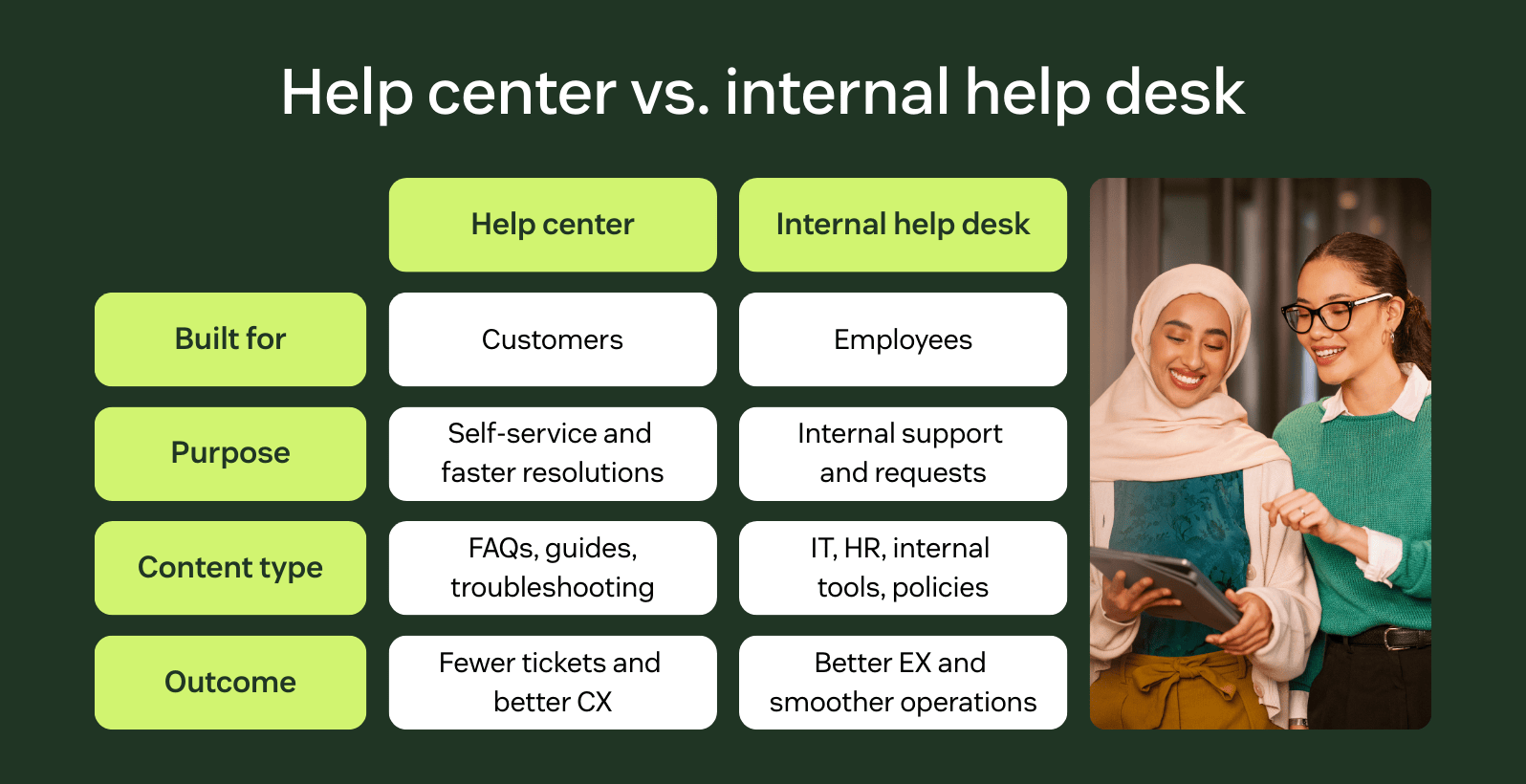
A help center is a customer-facing, self-service resource designed to help external customers find answers, resolve issues, and use products or services independently. It typically includes FAQs, how-to guides, and troubleshooting articles, playing a key role in supporting companies that invest in customer experience by reducing support volume.
An internal help desk, by contrast, supports employees rather than customers. It serves as a centralized hub for internal information, such as IT support, HR processes, tools, and company policies, helping employees get the assistance they need to do their jobs efficiently.
While both rely on shared knowledge, their audiences, goals, and use cases are different. Help centers focus on customer self-service and resolution, while internal help desks focus on employee support and internal operations.
Explore Zendesk’s help center features
Zendesk’s help center, known as Zendesk Knowledge, helps teams deliver fast, intuitive self-service that scales as customer needs grow. The AI-powered knowledge capabilities make creating, managing, and improving help center content fast and straightforward. For customers, accessing accurate answers from whichever channel they’re using has never been easier.
As part of the Zendesk Resolution Platform, the help center connects knowledge with your broader customer service workflows, helping reduce repetitive tickets and support more efficient resolutions. Explore Zendesk Knowledge to see how you can build self-service that delights both customers and support teams.
Lauren Hakim
Director, Product Marketing
As Director of Product Marketing at Zendesk, Lauren leads go-to-market strategy for AI Agents and Knowledge. She focuses on how AI can improve resolution rates and empower support teams through scalable automation and smarter self-service.
Watch a quick help center demo
Explore Zendesk's smart knowledge base software for better self‑service and empowered agents.